All posts
Simplifying Container Management with Taskonaut: An Open Source CLI Tool from Schematic
Blog· Jasdeep Garcha·Jan 6, 2025
Jasdeep Garcha·Jan 6, 2025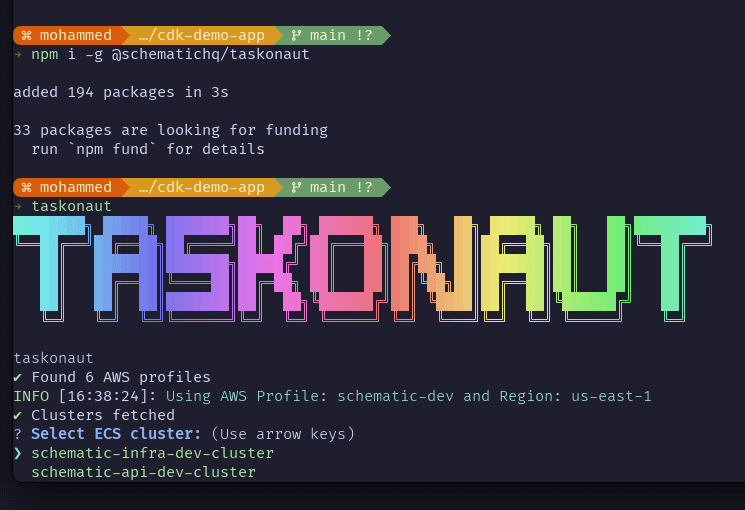
Managing containers can make you feel crazy. If you’ve worked with platforms like AWS ECS, you’ve probably experienced the frustration of manually pulling task IDs, attaching shells to containers, or switching between configurations. These tasks are repetitive, error-prone, and a drain on energy (it was for us).
That’s why we built Taskonaut, a CLI tool to streamline container management. With it, you can skip the manual steps and get straight to what matters: running your applications.
But Taskonaut isn’t just about solving a technical challenge—it’s about contributing to the broader developer community. We believe in the power of open source because it fosters collaboration, accelerates new ideas, and empowers developers everywhere to build better products.
By open-sourcing Taskonaut, we hope to make container management easier for our team, but for anyone working with ECS. We hope this is the first of many tools we can contribute to the community.
Whether you’re a seasoned DevOps engineer or a developer just getting started, Taskonaut is designed to fit into your workflow and save you time. Before diving into how the tool works, let’s take a look at how container management is traditionally handled and why Taskonaut is such an improvement.
How to Manage Containers Without Taskonaut
Managing containers manually involves a series of time-consuming steps. Here's an example of how you might attach to a container in AWS ECS:
List Available Clusters
Use the AWS CLI to retrieve a list of clusters:
typescript
aws ecs list-clustersSelect a Cluster and List Tasks
Identify the cluster you’re working with, then list the tasks running in that cluster:
typescript
aws ecs list-tasks --cluster <cluster-name>Retrieve Task Details
For a specific task, describe its details to identify the container instance:
typescript
aws ecs describe-tasks --cluster <cluster-name> --tasks <task-id>Find the Container Instance
Locate the container instance and use its details to connect:
typescript
aws ecs describe-container-instances --cluster <cluster-name> --container-instances <container-instance-id>Connect to the Container
Use ssh to connect to the EC2 instance hosting the container, or use a command like this to attach a shell:
typescript
aws ecs execute-command --cluster <cluster-name> --task <task-id> --container <container-name> --interactive --command "/bin/bash"Repeat for Multiple Configurations
If you’re working with multiple clusters or profiles, you’ll need to switch AWS CLI profiles and repeat the process. While this workflow works, it’s tedious, especially if you manage multiple profiles or frequently switch clusters. This is where Taskonaut steps in.
How Taskonaut Simplifies the Process
Taskonaut eliminates the complexity of managing containers with an intuitive, interactive interface. Instead of juggling commands and IDs, Taskonaut guides you through the process step-by-step, automating much of the work.
Here’s how to get started with Taskonaut:
How to Use Taskonaut
Install Taskonaut
First, install Taskonaut globally using npm:
typescript
npm install -g @schematichq/taskonautConfigure AWS Profile and Region
Use the following command to set up your AWS profile and region:
typescript
taskonaut config setShow Current Configuration
View your active configuration to ensure everything is set up correctly:
typescript
taskonaut config showRun Diagnostics
Before running tasks, verify your environment setup using the doctor command:
typescript
taskonaut doctorStart an Interactive Session
Launch Taskonaut to start an interactive session:
typescript
taskonautDuring the session, Taskonaut will guide you through selecting a cluster, viewing tasks, and choosing a container to interact with.
Execute Commands in a Container
Once you’ve selected your container, Taskonaut seamlessly attaches a shell or executes your chosen commands, no need to retrieve task or container IDs manually.
Summary
Managing containers doesn’t have to be a chore. Whether you’ve been handling it manually or are looking for a smarter way to do it, Taskonaut should save you time and reduce toil.
Visit the Taskonaut page on npm to get started, or check out the GitHub repository to explore the code and contribute.